Adding an existing host to a group in an Ansible Tower Inventory

With each new release of Ansible comes the addition of more Ansible modules provided as part of Ansible Core. However, sometimes the modules do not provide enough functionality. That is where other modules such as the uri module can be used to plug in any gaps.

An example of this gap is when adding an existing host to a group in an Ansible Tower inventory. The tower_host Ansible module can be used to add a host to an inventory on Ansible Tower, but cannot be used to add said host to a particular group (despite this functionality being available in the Ansible Tower Web UI). This can be frustrating if Ansible Tower is used as an inventory source (if there is a lack of an appropriate dynamic inventory to use).

There appears to be an open issue (https://github.com/ansible/awx/issues/5177) raised on Github to track this issue, but what if you can’t wait for an official fix?

There are a few solutions to this issue:

  • Use the command or shell module to run tower-cli to associate the host to the appropriate group in the Ansible Tower inventory.
  • The Ansible Tower REST API provides this functionality. However, it requires looking up the inventory ID and group ID.
  • Create a Smart Inventory and define a host filter.

The solution I’m going through though is using the uri module. Referring to the API documentation (https://docs.ansible.com/ansible-tower/latest/html/towerapi/api_ref.html#/Groups/Groups_groups_hosts_create), here is an example where I use the uri module to assign the host to the group in the following task:

- name: Add the host to a Tower Inventory group via API
  uri:
    url: "https://{{ ansible_tower_host }}/api/v2/groups/{{ group_id }}/hosts/"
    body:
      name: "{{ host }}"
      inventory: "{{ inventory_name }}"
    body_format: json
    headers:
      Content-Type: application/json
      Authorization: "Bearer {{ token }}"
    method: POST
    status_code: 204

With the above example, I have assumed you’ve authenticated previously in a different task and pass the token in the request header. The reason why I have chosen using the Ansible Tower API is that it does not require tower-cli to be installed either on the Ansible control node or where the task is running.

This is just a basic example, but hopefully can be used as a basis for something more substantial if required.

Ansible support in Red Hat Satellite 6.4

With the introduction of Red Hat Satellite version 6.4, Ansible Core is now installed as part of the Red Hat Satellite installation, as well as integration with Ansible Core features itself. But what does this look like in the web UI?

Ansible roles on the Satellite or Capsule server can be imported into Satellite, if they reside in the /etc/ansible/roles directory (by default). Note that only rhel-system-roles (from the extras repository) are supported by Red Hat, unless an Ansible Engine subscription is purchased.

Once added to the Satellite server, Satellite will be able to see the Ansible roles, ready for importing.

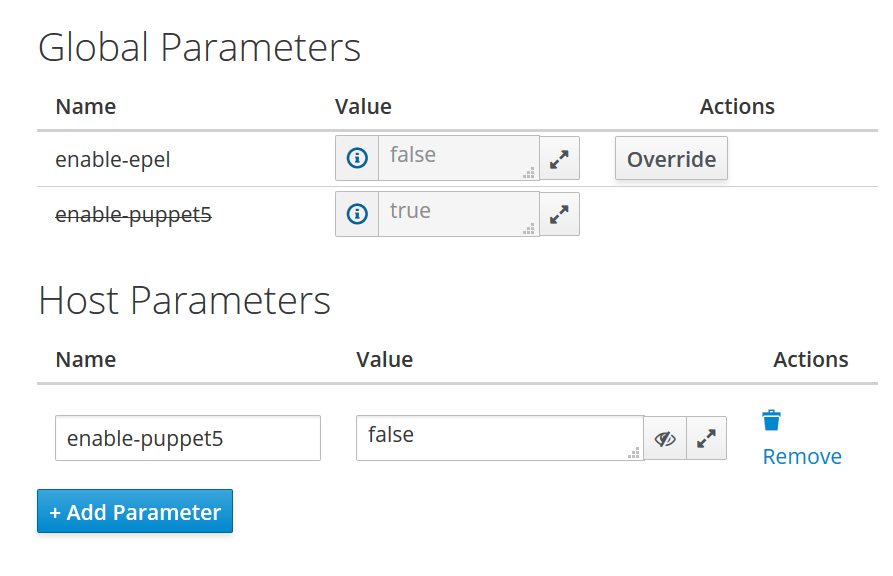
Once the Ansible roles have been imported into Satellite, roles can be assigned to hosts – can be during or post provisioning of hosts. Parameters can be passed along to the Ansible roles through host parameters or global parameters.

This screenshot shows the Parameters tab in the Create Host page. This is the same section used to customise any values for provision templates as well.

Ansible playbooks on the other hand can be implemented as another form of job templates, except using YAML with Embedded Ruby (ERB) templating code. Using the default job template Satellite uses to apply roles to hosts as an example, the the first half of the job template appears to be a standard playbook. But after the roles: section of the template, there’s ERB templating block which takes a list of all roles assign to a host and dynamically inserts the roles into the template. Therefore, the rendered final playbook will have the list of roles instead of the ERB templating block.

Apart from the <% %> block, the job template resembles an Ansible playbook.

Other things to note about the Ansible integration with Red Hat Satellite 6.4:

  • Remote Execution needs to be enabled from the Satellite or Capsule servers to the host. SSH traffic should be allowed as well (for Linux and Unix hosts).
  • Set up SSH keys for the remote user that will be executing Ansible on the remote host (for Linux and Unix hosts).
  • The Satellite or Capsule servers must be able to resolve the FQDN of the host, otherwise the Connect by IP setting in Administer > Settings > RemoteExecution tab needs to be set to yes.

That was just a brief introduction to the Ansible integration in Red Hat Satellite 6.4, which I’m sure will just be the beginning of further integrations in future releases.

RBAC in Keystone and OpenStack

The following post is based on Red Hat OpenStack Platform 10 (Newton) but should largely be compatible with other OpenStack distributions of the equivalent version.

Keystone allows defining roles as a way of assigning an OpenStack user or group’s privileges. For example, the default admin user has the admin role assigned to it:

[stack@controller ~]$ openstack role assignment list --names --user admin --project admin
+-------+-------+---------+
| Role  | User  | Project |
+-------+-------+---------+
| admin | admin | admin   |
+-------+-------+---------+

By default, OpenStack comes with two useful roles defined out of the box – admin and _member_:

  • admin – Used for users and/or groups which require privileged access to OpenStack resources and services. 
  • _member_ – Users or groups that are members of an OpenStack project can create/modify/delete resources within their own project. However they cannot see or modify resources outside the project (unless it is defined as shared or public). The OpenStack source code contains hardcoded references to the _member_ role and is treated as a default role, though this can be customised in each service’s configuration file.

Additional roles can easily be created using the openstack role create command, but will not normally have any affect on users or groups. This is because the actual rules associated with the roles determining what a user or group can do are defined separately by each OpenStack service, using a file called policy.json or policy.yaml. Each of these rules are assessed whenever an API request has been made to the OpenStack service and if the policy does not allow for a request to be performed, an error message will be displayed. As a result, the policy files will need to be modified for any custom privileges an additional role requires. Default policy rules exist for the OpenStack services. However, most services have not defined the rules in a default policy file. 

How an OpenStack service processes policies

To demonstrate this workflow, lets use nova as an example. By default, only a user/group assigned an admin role or the owner of an instance can reboot an instance. If we try this (reboot an instance outside our project as a non admin), I get the following error message:

[stack@controller ~]$ nova reboot 3a4b2f15-ca10-95e2-41ab-56a21cb5db21
Policy doesn't allow os_compute_api:servers:reboot to be performed. (HTTP 403) (Request-ID: req-32453065-1af5-4130-ba18-5a66be43d61e)
ERROR (CommandError): Unable to reboot the specified server(s).

To see what is going on in the background though, lets trace this nova command using the –debug option. The debug option is very useful in going into detail the underlying REST API requests the CLI commands make to their respective OpenStack service APIs. As you can see below, the policy is assessed when the actual API request is made to the nova API to reboot the instance (output omitted before reboot API request for brevity reasons):

[stack@controller ~]$ nova --debug reboot 3a4b2f15-ca10-95e2-41ab-56a21cb5db21
(... output omitted ...)
 
DEBUG (session:342) REQ: curl -g -i -X POST https://192.168.1.10:13774/v2.1/servers/3a4b2f15-ca10-95e2-41ab-56a21cb5db21/action -H "Accept: application/json" -H "User-Agent: python-novaclient" -H "OpenStack-API-Version: compute 2.37" -H "X-OpenStack-Nova-API-Version: 2.37" -H "X-Auth-Token: {SHA1}XXXXXXXX" -H "Content-Type: application/json" -d '{"reboot": {"type": "SOFT"}}'
DEBUG (connectionpool:401) "POST /v2.1/servers/3a4b2f15-ca10-95e2-41ab-56a21cb5db21/action HTTP/1.1" 403 110
DEBUG (session:390) RESP: [403] Openstack-Api-Version: compute 2.37 X-Openstack-Nova-Api-Version: 2.37 Vary: OpenStack-API-Version, X-OpenStack-Nova-API-Version Content-Type: application/json; charset=UTF-8 Content-Length: 110 X-Compute-Request-Id: req-ce835787-9ac4-4e1d-922e-e7f069cc63ab Date: Thu, 15 Nov 2018 00:15:00 GMT
RESP BODY: {"forbidden": {"message": "Policy doesn't allow os_compute_api:servers:reboot to be performed.", "code": 403}}
 
DEBUG (client:85) POST call to compute for https://192.168.1.10:13774/v2.1/servers/3a4b2f15-ca10-95e2-41ab-56a21cb5db21/action used request id req-ce835787-9ac4-4e1d-922e-e7f069cc63ab
Policy doesn't allow os_compute_api:servers:reboot to be performed. (HTTP 403) (Request-ID: req-ce835787-9ac4-4e1d-922e-e7f069cc63ab)
DEBUG (shell:984) Unable to reboot the specified server(s).
Traceback (most recent call last):
  File "/usr/lib/python2.7/site-packages/novaclient/shell.py", line 982, in main
    OpenStackComputeShell().main(argv)
  File "/usr/lib/python2.7/site-packages/novaclient/shell.py", line 909, in main
    args.func(self.cs, args)
  File "/usr/lib/python2.7/site-packages/novaclient/v2/shell.py", line 1787, in do_reboot
    _("Unable to reboot the specified server(s)."))
  File "/usr/lib/python2.7/site-packages/novaclient/utils.py", line 413, in do_action_on_many
    raise exceptions.CommandError(error_msg)
CommandError: Unable to reboot the specified server(s).
ERROR (CommandError): Unable to reboot the specified server(s).

OpenStack has documentation on how to interpret the rules defined in a policy file as well as the required syntax of the configuration files. Please refer to https://docs.openstack.org/oslo.policy/latest/admin/policy-json-file.html for the policy.json format and https://docs.openstack.org/oslo.policy/latest/admin/policy-yaml-file.html for the policy.yaml format.

Some OpenStack services themselves document how their APIs map to the rules in the policy files. Please refer to https://docs.openstack.org/nova/latest/configuration/policy.html for the nova rules and https://docs.openstack.org/keystone/latest/getting-started/policy_mapping.html for keystone rules.

Using the previous section example of rebooting a nova instance, lets have a quick look at the rules defined for it in the nova policy. The rule associated with this action is defined below (using policy.json format):

"os_compute_api:servers:reboot": "rule:admin_or_owner"

The left hand side of the line refers to the target of the rule, i.e. where the rule will be applied. The right hand side of the line refers to the rule itself. In this case, it is referencing another rule (called an alias) defined in the same policy file called admin_or_owner:

"admin_or_owner": "is_admin:True or project_id:%(project_id)s"

The rule here in this case is a Boolean expression comparing two different attributes. The first part of the rule is verifying if the request is using a keystone admin token. The second part of the rule is verifying the project_id atrribute from the API itself, essentially if the user/group who is performing the request has the same project uuid as the resource being requested. Since this is an OR expression, either condition can be true in order for the rule to be applied.

At a project level, there is a push to move towards what is called Policy as Code, where the default policy rules are defined as python code. By default it is located in /usr/lib/python2.7/site-packages/<service>/policies directories and the idea is that the end user can generate their own sample policy files for a specific service themselves if they require custom policy rules with the following command:

oslopolicy-policy-generator --namespace <service> --output-file <filename>

Please refer to the following link for additional information about Policy as Code:

https://docs.openstack.org/oslo.policy/latest/user/usage.html#registering-policy-defaults-in-code

Workaround for a uri module issue in Ansible

Its worth noting that in the current version of Ansible (2.6.3-1) as of writing contains a bug (https://github.com/ansible/ansible/issues/37182) in relation to support for content type x-www-form-urlencoded, which will be fixed in the Ansible 2.7 release.  There is a workaround for this bug though, by setting the body_format to raw and then passing the body as form encoded string itself works.
Lets use an example calling keycloak for an authentication token. The keycloak REST API expects an x-www-form-urlencoded string containing the credentials to authenticate against:
- uri:
    url: "{{ keycloak_server_url }}"
    method: POST
    body: "username={{ keycloak_username }}&password={{ keycloak_password }}&grant_type={{keycloak_grant_type }}&client_id={{keycloak_client_id }}"
    headers:
      Content-Type: "application/x-www-form-urlencoded"
    validate_certs: no
  register: response
In this task, the body will be passed to the API as-is without the module trying to convert the body contents into JSON. The bug fix should make what is passed through to the API clearer though.

Consuming REST APIs using Ansible

One of the reasons why I like Ansible is the simplicity in its automation approach. As long as there is a module for what you’re trying to automate, chances are its easy to achieve.

However, not all functionality can be automated using core Ansible modules. If your application or service has a REST API though you can use the Ansible uri module. The uri module allows you to perform REST API requests in a declarative manner. What I like about the module is that you can then combine the response output of the request with supported Ansible jinja2 filters to perform powerful queries.

Lets use a simple example of obtaining the next available IP address from a network defined on an Infoblox grid appliance using the Infoblox REST API.

As per the Infoblox REST API reference guide, firstly you will need to obtain the Infoblox network reference as it will be used in subsequent API requests. The Ansible task for that would something like this:

- name: Obtain Infoblox network reference for 172.25.25.0/24
  uri:
    url: "{{ infoblox_url }}/network?network={{ network_address }}"
    method: GET
    user: "{{ infoblox_username }}"
    password: "{{ infoblox_password }}"
    validate_certs: no
  register: network_ref_response

where {{ infoblox_url }}, {{ network_address }}, {{ infoblox_username }} and {{ infoblox_password}} are Ansible variables defined either earlier in the playbook or passed through as extra_vars on the command line.

The register statement is key here. It tells Ansible to store the output of the task into another variable called network_ref_response. If you want to view the contents of the variable, you can either use debug mode (pass argument -vvv on the command line) or the debug module, which will dump the variable contents in stdout.

Next I will want to extract the Infoblox network reference and the session cookie (so I don’t have to pass through user/password on every request). To do this I use the set_fact module, which I can use to assign values to a ‘fact’ variable for use later on.

- name: Extract the Infoblox reference for the network
  set_fact:
    network_ref: "{{ network_ref_response.json[0]._ref }}"
    infoblox_cookie: "ibapauth={{ network_ref_response.cookies.ibapauth }}"

The Infoblox network reference will look something like the following:

network/ZG5zLm5ldHdvcmskMTcyLjI1LjI1LjAvMjQvMA:172.25.25.0/24/default

Now using the network reference, I can query the Infoblox REST API:

- name: Query Infoblox network for next available IP address
  uri:
    url: "{{ infoblox_url }}/{{ network_ref }}?_function=next_available_ip"
    body:
      num: 1
    body_format: json
    method: POST
    headers:
      Cookie: "{{ infoblox_cookie }}"
    validate_certs: no
  register: network_next_ip
Notice the body section of the task. In YAML it is known as a dictionary. If you specify the body_format as json, Ansible will actually convert the dictionary into json and POST it to the API:
{
  "num": 1
}
Here is the actual API response:
"network_next_ip": { 
       "cache_control": "no-cache, no-store",  
       "changed": false,  
       "connection": "close",  
       "content_type": "application/json",  
       "cookies": {},  
       "cookies_string": "",  
       "date": "Thu, 30 Aug 2018 06:08:43 GMT",  
       "failed": false,  
       "json": { 
           "ips": [ 
               "172.25.25.1" 
           ] 
       },  
       "msg": "OK (unknown bytes)",  
       "pragma": "no-cache",  
       "redirected": false,  
       "status": 200,  
       "transfer_encoding": "chunked",  
       "url": "https://infoblox/wapi/v2.0/network/ZG5zLm5ldHdvcmskMTcyLjI1LjI1LjAvMjQvMA:172.25.25.0/24/default?_function=next_available_ip" 
   }
As you can see in the json object, the API returns a list of IP addresses you can consume. Ansible supports either [] or dot notation for accessing dictionary values. Therefore using the IP address would look something like the following:
- debug:
    msg: "{{ network_next_ip.json.ips[0] }}"
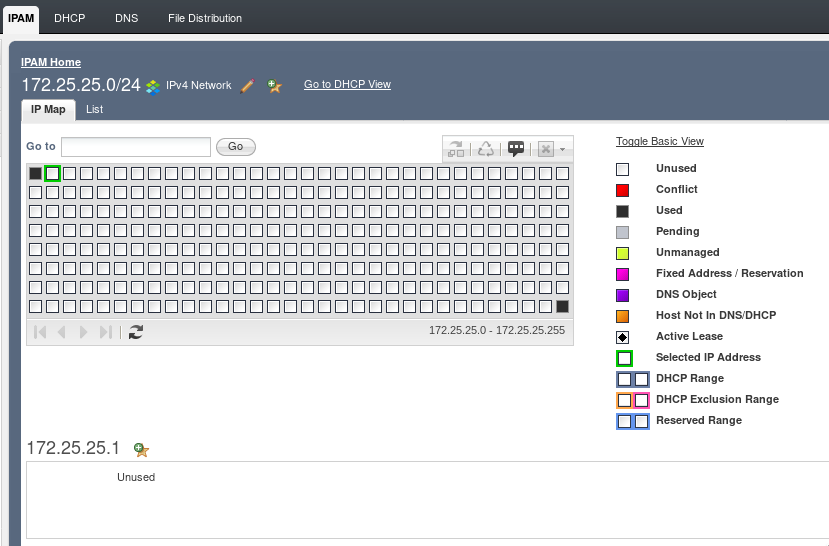
To confirm, here’s the network map in Infoblox:
infoblox_network_view

The next available IP address for that network is indeed 172.25.25.1.

Although you could in theory use a bunch of curl commands to achieve the same outcome,  I think it is much easier to do this using Ansible without convoluted logic.


Enabling nested KVM for OpenStack/Packstack

A month or two ago I tried deploying an all-in-one Packstack OpenStack distribution, all in a single KVM virtual machine, for CloudForms testing. Using the instructions from the RDO project, I was able to deploy OpenStack without too many issues (hint: use flat networking if you experience configuration issues with neutron). However, I wanted to enable nested KVM for improved performance of the nova instances deployed, which the install instructions doesn’t really cover.

In order to get nested KVM working, I had to perform the following steps.

  • Enable kernel module settings for nested KVM (processor-dependant) on the KVM host as well as the VM where Packstack will be deployed. Ensure the following lines are present (for Intel CPUs):
# cat << EOF > /etc/modprobe.d/kvm.conf
options kvm-intel nested=1
options kvm-intel enable_shadow_vmcs=1
options kvm-intel enable_apicv=1
options kvm-intel ept=1
EOF
  • Configure the Packstack VM’s nova.conf so that it is using KVM as its hypervisor instead of using qemu software emulation (which is really slow). The following line needs to be in /etc/nova/nova.conf in the [libvirt] section:
# grep ^virt_type /etc/nova/nova.conf  
virt_type=kvm
  • Enable reverse path filtering on the KVM host and the Packstack VM, then reboot your KVM host and VM:
# cat << EOF > /etc/sysctl.d/98-rp-filter.conf  
net.ipv4.conf.default.rp_filter = 0 
net.ipv4.conf.all.rp_filter = 0
EOF
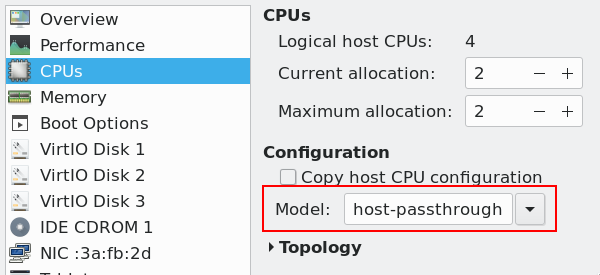
  • Ensure that the cpu mode set for the Packstack VM is set as the following, either using virsh edit <domain> or virt-manager (while the VM is powered off):
# virsh dumpxml <domain>| grep "cpu mode" 
 <cpu mode='host-passthrough' check='partial'/>

virt-manager-cpu-mode

  • To confirm that nested KVM is enabled after a reboot, see if /proc/cpuinfo displays the correct CPU flag (vmx or svm) inside the Packstack VM:
cat /proc/cpuinfo | egrep '(vmx|svm)' 
flags           : fpu vme de pse tsc msr pae mce cx8 apic sep mtrr pge mca cmov pat pse36 clflush dts acpi mmx fxsr sse sse2 ss ht tm pbe syscall nx pdpe1gb rdtscp lm constant_tsc art arch_
perfmon pebs bts rep_good nopl xtopology nonstop_tsc cpuid aperfmperf tsc_known_freq pni pclmulqdq dtes64 monitor ds_cpl vmx smx est tm2 ssse3 sdbg fma cx16 xtpr pdcm pcid sse4_1 sse4_2 x2a
pic movbe popcnt tsc_deadline_timer aes xsave avx f16c rdrand lahf_lm abm 3dnowprefetch cpuid_fault epb invpcid_single pti ssbd ibrs ibpb stibp tpr_shadow vnmi flexpriority ept vpid fsgsbas
e tsc_adjust bmi1 hle avx2 smep bmi2 erms invpcid rtm mpx rdseed adx smap clflushopt intel_pt xsaveopt xsavec xgetbv1 xsaves dtherm ida arat pln pts hwp hwp_notify hwp_act_window hwp_epp fl
ush_l1d


Once all the above steps have been implemented, nova will now be able to use KVM as a hypervisor inside the VM itself. However, I ran into an issue where I could not access any of the nested instances nova provisioned via nova boot or horizon, even after assigning a floating IP address to the instance.

When I did a little digging though I found that for any nova instances deployed, ensure that port security is disabled when using nested KVM. Normally you would want this enabled but in a testing/lab environment its OK to disable this setting. MAC address spoofing is used in nested virtualisation environments so that traffic can be routed to the nested instances.

port_security

Afterwards I was able to access all my nested nova instances. If you want, you can perform even more levels of nesting but performance degrades significantly the more levels this is done. I haven’t found a very compelling use case to go more than 1 level of nesting.

Ansible | OpenStack | CloudForms | Python | Linux