One of the reasons why I like Ansible is the simplicity in its automation approach. As long as there is a module for what you’re trying to automate, chances are its easy to achieve.
However, not all functionality can be automated using core Ansible modules. If your application or service has a REST API though you can use the Ansible uri module. The uri module allows you to perform REST API requests in a declarative manner. What I like about the module is that you can then combine the response output of the request with supported Ansible jinja2 filters to perform powerful queries.
Lets use a simple example of obtaining the next available IP address from a network defined on an Infoblox grid appliance using the Infoblox REST API.
As per the Infoblox REST API reference guide, firstly you will need to obtain the Infoblox network reference as it will be used in subsequent API requests. The Ansible task for that would something like this:
- name: Obtain Infoblox network reference for 172.25.25.0/24
  uri:
    url: "{{ infoblox_url }}/network?network={{ network_address }}"
    method: GET
    user: "{{ infoblox_username }}"
    password: "{{ infoblox_password }}"
    validate_certs: no
  register: network_ref_response
where {{ infoblox_url }}, {{ network_address }}, {{ infoblox_username }} and {{ infoblox_password}} are Ansible variables defined either earlier in the playbook or passed through as extra_vars on the command line.
The register statement is key here. It tells Ansible to store the output of the task into another variable called network_ref_response. If you want to view the contents of the variable, you can either use debug mode (pass argument -vvv on the command line) or the debug module, which will dump the variable contents in stdout.
Next I will want to extract the Infoblox network reference and the session cookie (so I don’t have to pass through user/password on every request). To do this I use the set_fact module, which I can use to assign values to a ‘fact’ variable for use later on.
- name: Extract the Infoblox reference for the network
  set_fact:
    network_ref: "{{ network_ref_response.json[0]._ref }}"
    infoblox_cookie: "ibapauth={{ network_ref_response.cookies.ibapauth }}"
The Infoblox network reference will look something like the following:
network/ZG5zLm5ldHdvcmskMTcyLjI1LjI1LjAvMjQvMA:172.25.25.0/24/default
Now using the network reference, I can query the Infoblox REST API:
- name: Query Infoblox network for next available IP address
  uri:
    url: "{{ infoblox_url }}/{{ network_ref }}?_function=next_available_ip"
    body:
      num: 1
    body_format: json
    method: POST
    headers:
      Cookie: "{{ infoblox_cookie }}"
    validate_certs: no
  register: network_next_ip
{
  "num": 1
}
"network_next_ip": {
       "cache_control": "no-cache, no-store",
       "changed": false,
       "connection": "close",
       "content_type": "application/json",
       "cookies": {},
       "cookies_string": "",
       "date": "Thu, 30 Aug 2018 06:08:43 GMT",
       "failed": false,
       "json": {
           "ips": [
               "172.25.25.1"
           ]
       },
       "msg": "OK (unknown bytes)",
       "pragma": "no-cache",
       "redirected": false,
       "status": 200,
       "transfer_encoding": "chunked",
       "url": "https://infoblox/wapi/v2.0/network/ZG5zLm5ldHdvcmskMTcyLjI1LjI1LjAvMjQvMA:172.25.25.0/24/default?_function=next_available_ip"
   }
- debug:
    msg: "{{ network_next_ip.json.ips[0] }}"
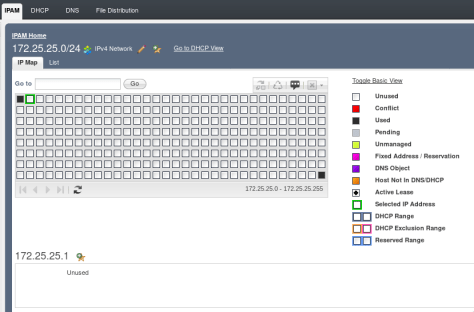
The next available IP address for that network is indeed 172.25.25.1.
Although you could in theory use a bunch of curl commands to achieve the same outcome, I think it is much easier to do this using Ansible without convoluted logic.
 Phuong's Consulting Journey